Transform Panel
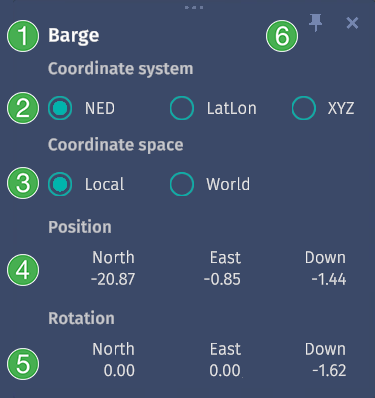
Transform panel with Barge selected
The Transform Panel shows the position and rotation of an object in real-time. The panel can be spawned by right-clicking on an object and selecting Show Coordinates from the context menu. This panel lets you view the position and rotation of an object, even if the object is not selected. Information can be displayed in different coordinate systems (NED, LatLon, XYZ) and in local or world coordinate spaces.
Features
Name of the object
Select a coordinate system (NED, LatLon, XYZ)
View coordinates in local or world space
Real-time view of the object’s position
Real-time view of the object’s rotation
Panel stays open until closed. Can be pinned anywhere on the screen.
Multiple transform panels can be open at once. Click a panel to bring it to the front. Double-clicking a transform panel centers the object relative to the camera.